
Reliable Power Backup is Critical for Industrial Applications
Power outages in industrial environments can result in millions of dollars in lost revenue, damage to equipment, and disruptions to production lines and warehouse operations. According to a study by Aberdeen Research, depending on the circumstances for the downtime, the cost for manufacturers can be as much as $260,000 an hour.*
Power outages can disrupt the entire manufacturing process, leading to material waste, delays in product delivery, and order fulfillment. Power surges or voltage fluctuations can damage sensitive equipment and create a dangerous environment, especially in facilities with hazardous materials.
A temporary loss of power in a warehouse can lead to disruption of operations, damage to equipment, loss of data, and safety hazards. It can also result in inventory spoilage, particularly in cold storage areas.
You rely on your UPS systems for backup if your power goes out. But will they provide a bridge of power long enough for what’s needed? It all depends on how much runtime your UPS systems provide.
If you use 3-Phase power, generally a runtime target of 5-15 minutes allows enough time to switch to generator power. Longer runtimes may be needed if generators are not used and when critical systems need to remain operational during extended outages.
Runtime Requirements
In this blog, we will provide a step-by-step approach to determining runtime requirements so you can find the right UPS model for your 3-Phase powered systems.
The first thing to consider is how much backup power you need. Most power outages may only last for five minutes, but some can be longer. To make sure your UPS systems are providing enough backup power for your most critical equipment, you need to understand runtime requirements. The UPS backup batteries will provide power for a set amount of time, known as runtime.
To calculate required runtime, you first need to determine how much power, or load, is needed by your connected equipment and the capacity of the UPS system batteries.
Calculate Total Wattage of Protected Equipment
There are three ways to find your wattage:
- Specified in the equipment’s user manual
- Located on the safety label of the device or the device’s power supply (specs are usually on the transformer)
- Voltage x Amperage = Wattage
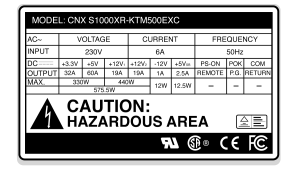
Note: When calculating the wattage load, your load level should not exceed 80% of the capacity of the UPS system. To establish the overhead capacity, multiply the total load by 125% to calculate the minimum capacity needed for the UPS system.
Example wattage Calculation:
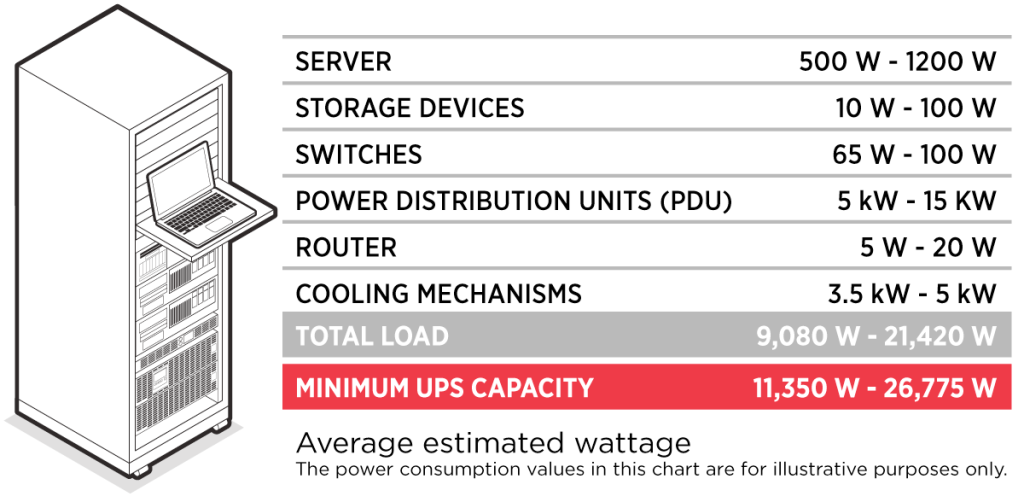
Note: In this scenario, the Total Load was multiplied by 1.25 to determine the UPS size with overhead.
Once you determine your load, contact a power expert from CyberPower to help you customize a power protection plan with the ideal power models to support all of your connected electronics.
Need Extra Runtime?
Every UPS system is different. Double check how much runtime your UPS batteries provide with a full load. If you need more runtime, you may need to get UPS systems with more capacity or add battery modules.
Available for select UPS systems, adding one or multiple battery modules can provide more runtime. Based on your load requirement, you can add modules to your system to reach your desired runtime. Other alternatives include connecting your UPS system to generators to gain a longer period of backup power.
Want to learn more?
https://www.cyberpowersystems.com/blog/how-a-ups-system-works-with-a-backup-generator/
https://www.cyberpowersystems.com/blog/runtime-recommendations/
Summary
Power outages are an unfortunate reality for manufacturing and warehouse operations, but you can stay powered and protected by choosing a UPS system with the appropriate level of backup power and runtime. Now you have the tools to calculate the runtime you need when the power goes out.
For more information and to find your next 3-Phase UPS system, https://www.cyberpowersystems.com/products/3-phase-modular-ups/
*Aberdeen study


